level6
主要提下level6和level8,前者是靠call (void)win()水过的,后者是花了比较多的精力才理解
You can modify the state of your target program with the set command. For example, you can use set $rdi = 0 to zero
out  rsp) = 0x1234
to set the first value on the stack to 0x1234. You can use set *((uint16_t *) 0x31337000) = 0x1337` to set 2 bytes at 0x31337000 to 0x1337.
Suppose your target is some networked application which reads from some socket on fd 42. Maybe it would be easier for
the purposes of your analysis if the target instead read from stdin. You could achieve something like that with the
following gdb script:
start
catch syscall read
commands
silent
if (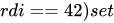 rdi = 0
end
continue
end
continue
This example gdb script demonstrates how you can automatically break on system calls, and how you can use conditions
within your commands to conditionally perform gdb commands.
In the previous level, your gdb scripting solution likely still required you to copy and paste your solutions. This
time, try to write a script that doesn’t require you to ever talk to the program, and instead automatically solves each
challenge by correctly modifying registers / memory.
level5是通过实时在终端中打印出对应位置的随机值,再手动输入;这题更进一步,要求脚本自动给随机值找到并输入。
在卡了几天后参考这位师傅的博客找到了解决方案:[Debugging Refresher](https://j-shiro.github.io/p/debugging-refresher/)
1 | 0x00005798218a7d0b in main () |
运行22次空指令后能找到cmp %rax,%rdx ,再运行一次就会发现要让函数往下走的要求就是要rax和rdx相等。脚本就很好写了.
在main+686中断并修改两个寄存器的值
1 | start |
然后最多运行64次continue就可以得到flag了
level8
As we demonstrated in the previous level, gdb has FULL control over the target process. Under normal circumstances, gdb
running as your regular user cannot attach to a privileged process. This is why gdb isn’t a massive security issue which
would allow you to just immediately solve all the levels. Nevertheless, gdb is still an extremely powerful tool.
Running within this elevated instance of gdb gives you elevated control over the entire system. To clearly demonstrate
this, see what happens when you run the command call (void)win().
Note that this will not get you the flag (it seems that we broke the win function!), so you’ll need to work a bit
harder to get this flag!
As it turns out, all of the levels other levels in module could be solved in this way.
GDB is very powerful!
当我们想要调用win()函数时会发生什么?
1 | 0x00005b9bc84e6b99 in main () |
查看一下win()的代码:
1 | 0x00005b9bc84e6951 <+0>: endbr64 |
1 | set $rip = 0x5bb43cb6b980 #实际上从win+35到win+47都行 |